
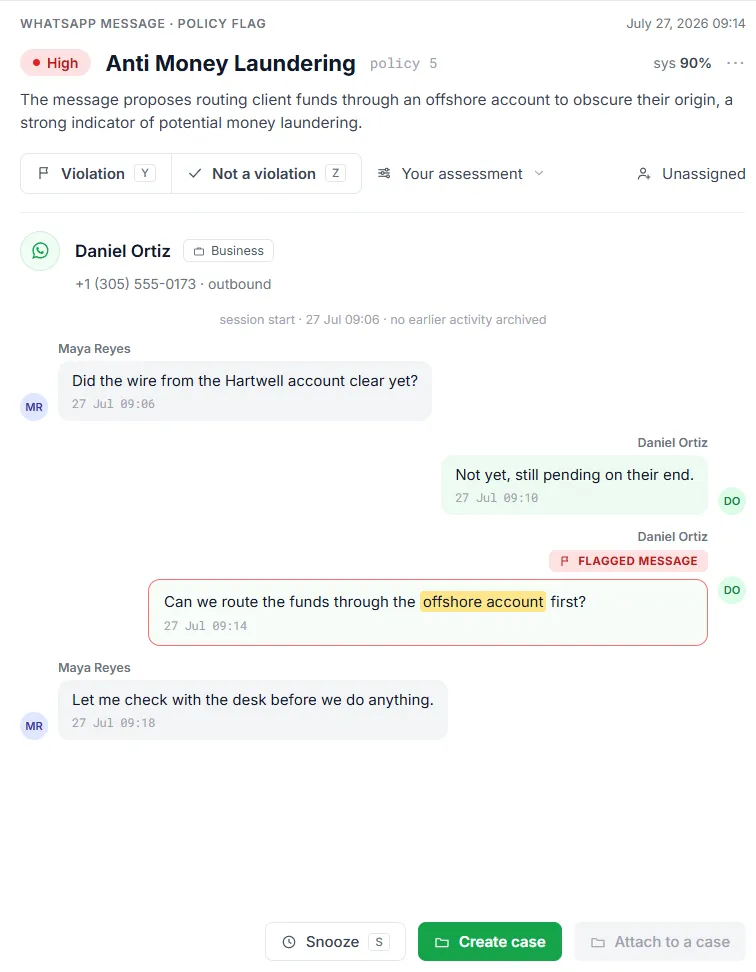
Storage is table stakes. Supervision is the job.
An archive answers a request after the fact. A supervision program runs every day: it looks at communications as they’re captured and asks whether anything is creating risk now. Comma runs your policies across captured communications continuously, flags what matters for review, and samples the rest. The archive is still there. The supervision layer on top is what makes oversight ongoing instead of episodic.
Internal Policy Violations
"I can get this approved faster if we just backdate the request."Regulatory Red Flags
"I promise you'll see a bump in Q3."Conflicts Between Policy and Practice
"If you go with it by Friday, I get a bonus, but honestly, I'd recommend it either way."
How policy matching works
Policy matching evaluates supported captured communications using your configured policies. Review happens inside the same system as the archive. Coverage depends on the content type, enabled features, and policy settings.
Comma captures the message
Start with the captured communications in scope for your review program. Confirm source coverage and enabled analysis for the content types your organization needs.Apply the policies your organization needs
Configure policy instructions, keywords, and review thresholds. Tune each policy to surface communications that warrant attention. Confirm processing and coverage requirements during your evaluation.Risky messages get flagged for review
Messages that match a policy are surfaced to your review queue with the policy they triggered. Your team reviews flagged items first, not the entire message stream.The rest gets sampled, not ignored
Comma spot-checks a share of non-flagged communications, at a rate you set, so you can evidence a review percentage across the whole population, not just the messages that matched a policy.
Review and escalation queues
Matched messages don’t just pile up, they route. Flags land in a review queue where your team works them the way supervision actually runs.
Dedicated queues
Separate queues by area so the right reviewer sees the right flags, instead of one undifferentiated pile.Escalation path
Route high-risk or ambiguous flags to an escalation queue for senior review.Assignment and ownership
Assign flags to reviewers and filter to what's yours, so nothing sits unowned.From flag to action
Connect a finding with a case when it needs further investigation. Agree preservation requirements and the enabled workflow for your deployment.Clear dispositions
Confirm a violation or mark it not a violation, and move the queue forward.
Bring your own policies
Standard coverage is the starting point, not the ceiling. Create your firm’s own policies in the dashboard and they run alongside Comma’s built-in ones, in the same queue and the same workflow, so a custom policy is never a second system to maintain.
- Build policies yourself in the dashboard, no waiting on a vendor to configure them
- Describe the risk you want caught in plain language, with the option to narrow it to specific terms
- Set each policy's sensitivity and spot-check rate on its own, tuned to how much risk it carries
See the compliance policies guide →
Why this isn’t keyword filtering
Keyword filtering flags messages that contain specific words. It doesn’t understand context, so “guarantee” gets flagged whether it’s a prohibited performance promise or an employee guaranteeing they’ll call someone back. The result is a flood of false positives, and the real violations get lost in the noise.
Policy matching uses policy instructions and conversation context to help prioritize review. Keywords can also narrow evaluation, while spot checks sample other communications. Reviewers assess the evidence and decide what the flag means; automated analysis can produce false positives and miss relevant content.
Connect review with investigation and administration
Use cases and e-discovery to explore how related evidence becomes an organized matter. The configuration guide explains policies, queues, and administrative choices. Bring a representative review scenario to an enterprise evaluation.
FAQ about Policy Matching
Does Comma include pre-built SEC/FINRA policies out of the box?
Which regulations require firms to review communications?
Does every source have the same surveillance coverage?
See policy matching in action.
We'll walk through a live demo with real messages, real flags, and real supervision workflows.
Related reading